
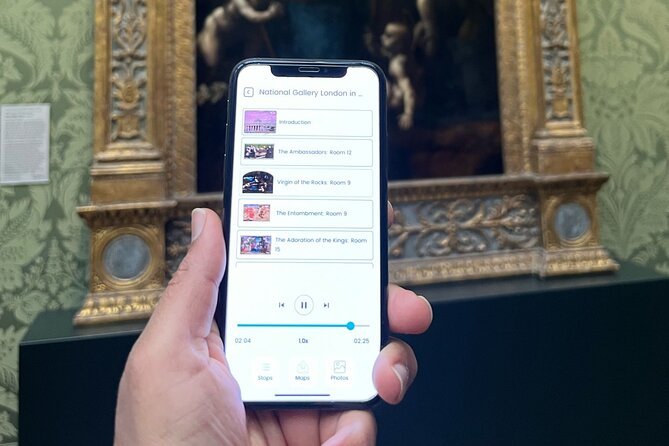
Reviewed · SELF-GUIDED TOURS
London National Gallery Self-Guided Tour with App (No Tickets)
A one-hour art walk beats a long museum slog. This National Gallery self-guided app tour is built for people who want key paintings, symbolism, and artist context without waiting around. I like that the app is offline once downloaded and runs for a full year, so you can use it in the museum or at home. I also like the way it’s paced for a short visit, with audio for 12 artworks instead of turning your day into a scavenger hunt. The main drawback to think about is that the audio only covers those 12 pieces, and the explanations may feel limited if you’re hoping every gallery stop gets full treatment.
You’ll start at the National Gallery by Trafalgar Square and follow the in-app map from painting to painting. Expect an easy plan (about 1–2 hours), no human guide in the room, and no physical stuff included like headphones. One more thing: a few people reported language issues (for example, they wanted French audio but found it English-only), so double-check your expectations before you go.
In This Review
- Key Points
- National Gallery, Faster: What $5.98 Actually Buys You
- Offline App Advantage: How to Use It Without Internet Worries
- Getting Oriented at Trafalgar Square: Where Your Tour Begins
- Stop 1: Your One-Hour Walk Through 12 Key Paintings
- How the pacing works
- What the audio actually covers
- Where the map helps (and where it won’t)
- What You’ll Love Most: Highlights, Structure, and No Waiting
- The Possible Downsides: Limited Coverage, Language Hiccups, and Tech Access
- Audio coverage is limited to 12 works
- Language expectations may not match what you want
- No headphones or physical devices included
- Access/code problems can happen
- Price and Value: When This App Makes Sense (and When It Doesn’t)
- How It Fits in Your London Day Plan
- Should You Book This National Gallery Self-Guided App Tour?
- FAQ
- How long does the National Gallery app tour take?
- Is an entry ticket included?
- Does the app work without internet?
- How many artworks are included in the audio?
- Can I reuse the tour later?
- Where do I start this self-guided tour?
- Do I need headphones?
- Is there a human guide during the experience?
- What’s the cancellation policy?
Key Points
- Offline-first app use: Download once, then listen with no internet
- Designed for short visits: Built around a ~1-hour loop
- Audio covers exactly 12 artworks: Great for highlights, not for full coverage
- Works on iPhone and Android for a year: Useful even if your schedule shifts
- In-app map for navigation: Helps you find the next painting faster
- Not a human guide: You control pace, but you also control questions
Still deciding? A handful more London outings we rated
- London: Tower Bridge Entry Ticket
★ 4.7 · 15,560 reviews - London: St Paul’s Cathedral Entry Ticket
★ 4.7 · 9,813 reviews - London: London Eye and Madame Tussauds Combo Ticket
★ 4.7 · 7,428 reviews - Buckingham Palace: The State Rooms Entrance Ticket
★ 4.6 · 7,395 reviews
National Gallery, Faster: What $5.98 Actually Buys You

At $5.98 per person, you’re not paying for museum entry. The National Gallery admission is free, and this tour price is for the experience layer: the Tourific smartphone app with audio and a map.
That distinction matters. If your goal is to see the museum’s most famous works in a time window you can actually protect (lunch break energy, late-afternoon energy), this kind of paid add-on can feel like good value. You’re basically buying structure: a suggested route, short talks, and an audio track that tells you what you’re looking at without requiring you to read every plaque.
Also, this is a small-group product on paper, with a maximum of 20 travelers. Since it’s self-guided, that doesn’t translate into a roaming guide, but it usually means fewer people chasing the same “start” instructions at once, which can make your download/login moment less chaotic.
Offline App Advantage: How to Use It Without Internet Worries
This tour’s biggest practical win is the offline setup. After you book, you’ll get instructions (including how to access your tour), then you can download the tour to your phone. Once it’s downloaded, you can use it in the museum with no internet connection.
That’s a big deal in London museums, where Wi‑Fi can be hit-or-miss and phone data can vanish just when you need it most. Offline audio also means you don’t have to keep your screen bright, which helps you focus on the painting instead of your battery.
One caution: not everything is guaranteed to be instant. One person reported delays getting a code and had to spend a frustrating chunk of time trying to resolve it. So when you book, don’t do it five minutes before you leave the hotel. Give yourself time to sort access at home on Wi‑Fi, then test that the app opens and the audio works before you step into the museum.
Getting Oriented at Trafalgar Square: Where Your Tour Begins
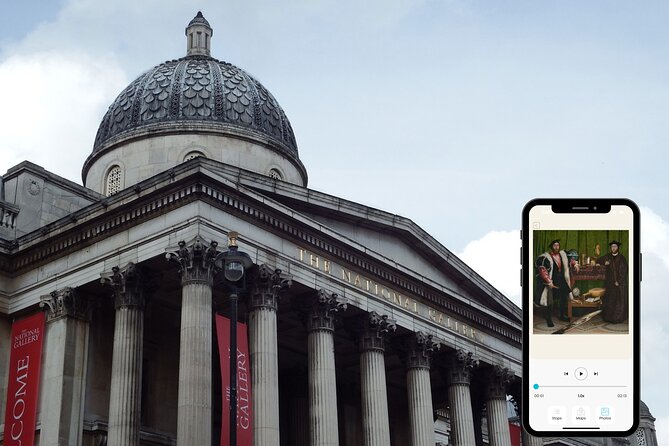
Your tour starts at the National Gallery on Trafalgar Square (WC2N 5DN). This is helpful because it’s a landmark area. You can anchor yourself visually: you know where you are, and you can build your visit around other sights in the square.
The activity ends back at the starting point, which fits the “quick highlight loop” idea. In other words, you’re not signing up for a half-day maze across multiple wings. Your phone acts like your guide, and the route brings you through the most recognizable pieces without demanding you memorize the museum layout.
If you’re planning the rest of your day, this is also a good time anchor. The National Gallery is open daily from 10:00 AM to 6:00 PM during the operating window listed, so you can plug your 1–2 hour visit into a wide range of schedules.
Still deciding? A handful more London outings we rated



Stop 1: Your One-Hour Walk Through 12 Key Paintings
The heart of the tour is an hour-long route designed around 12 of the museum’s most renowned paintings. The app doesn’t just read plaque text to you. It points your eyes toward what to notice: the artist’s choices, standout stylistic features, and symbolism hidden in plain sight.
How the pacing works
This is the kind of tour you do when you want a payoff fast. You’ll move from painting to painting using the app’s map and audio prompts. The route is meant to be compact enough that you can finish in about an hour if you stay focused, or stretch to closer to 1–2 hours if you slow down to look closely.
That pacing is a feature. The National Gallery is famous for a reason, but it can also tempt you into “I’ll just see one more gallery room” syndrome. This tour resists that. It says: choose the highlights, get the stories, then leave with your brain full and your feet intact.
What the audio actually covers
The audio commentary is AI-narrated and centered on those 12 artworks chosen by the team. It focuses on artist context, what makes each painting distinctive, and what symbols might mean. The overview also suggests the route spans major names and styles across centuries—think the range from Da Vinci-era influence up through Rubens and into Van Gogh.
One key thing to understand: this is not a full guide to every masterpiece in the building. It’s a curated “greatest hits” selection. If you’re the kind of visitor who likes to read every plaque and chase special exhibits, you might find it feels short.
Where the map helps (and where it won’t)
The app includes an in-app map for navigation. That’s useful for the moments when you’re standing in front of a gallery label, wondering where the next piece is located. It can help you avoid doubling back.
But you still need the basics: look at the painting you’re at, then follow the app’s next step. If the museum is busy, you may still have to work around other visitors standing in tight viewing spots. The map won’t change that reality—it just helps you arrive at the next work with less guessing.
What You’ll Love Most: Highlights, Structure, and No Waiting
If you want the museum’s most famous works with less planning stress, this tour is built for you. The reviews highlight that it can feel eye-opening and informative, especially for people going as a family or for first-time visits.
Here’s what that means in real life:
- You get story with your looking. The audio is meant to go beyond the plaque, pointing out symbolism and stylistic features.
- You can control the pace. There’s no schedule to chase. If you want to replay a section, you can.
- You skip decision fatigue. You don’t have to create a route from scratch. The app already picked the “must-sees.”
One more practical benefit that comes up in feedback: some people liked that the visit felt efficient with less time spent waiting. Since this product doesn’t sell tickets, you’ll still rely on the National Gallery’s free entry system, but the tour’s structure can help you feel like you’re not wasting time once you’re inside.
The Possible Downsides: Limited Coverage, Language Hiccups, and Tech Access

This is where I’d be honest with my advice, because self-guided apps can be either perfect or annoying depending on what you expect.
Audio coverage is limited to 12 works
A key complaint is that people expected broader coverage and discovered the audio only covers a dozen paintings. So if you’re imagining an all-in, “walk through the whole National Gallery with commentary” type experience, this won’t match that.
Think of it like a well-produced highlight reel, not a complete documentary.
Language expectations may not match what you want
Another issue: one review noted they expected access to audio in French but found everything was in English. The tour data here doesn’t list supported languages, so I can’t promise what you’ll get. If language matters a lot to you, make sure your comfort level is aligned with English audio before you buy.
No headphones or physical devices included
The tour doesn’t include headphones. You can still listen on your phone’s speaker, but that’s rarely ideal inside a museum. Bring your own headphones if you want audio without bothering others, and keep volume low so you don’t feel like you’re watching a video in public.
Access/code problems can happen
Because you’re relying on an app access code and download steps, there’s a chance of tech friction. One user described spending time trying to get a code to arrive after repeated prompts. That’s not the norm in every situation, but it’s enough that you should plan to set up the tour well before you arrive.
Price and Value: When This App Makes Sense (and When It Doesn’t)
Let’s do the value math without pretending it’s magic.
You pay $5.98 for:
- access to the tour on the Tourific app
- offline use after download
- an in-app map
- AI audio for 12 paintings
- the ability to replay the audio at the location or at home for a year
You save the money that would go to a human guide, and you save time on planning. You also avoid the mental load of figuring out which rooms and artworks to prioritize.
So this is a strong option if:
- you’re visiting for the first time and want a “best of” route
- you have a tight timeframe and can’t spend half a day
- you prefer a low-cost, on-demand experience where you control pacing
It’s a weaker option if:
- you want deep commentary for more than 12 works
- you’re hoping for a broad walkthrough of the collection
- language support is a must-have and you’re not comfortable with English
How It Fits in Your London Day Plan

The National Gallery sits in a central, walkable area. That makes this tour a good “middle of the day” or “after-the-morning-sights” choice, when you want something cultural but still time-efficient.
Try this approach:
- arrive with a plan for an hour, then decide on the spot whether to extend
- after the audio route, wander a little on your own and compare what you saw with what you notice now
- if you’re pairing this with nearby sights, keep the museum visit close to peak energy hours because you’ll be walking between paintings
The app being playable at home for a year also means you can turn the visit into a mini study session later. That’s not required, but it’s a nice extra if you like remembering what you saw.
Should You Book This National Gallery Self-Guided App Tour?
Book it if you want a structured, affordable way to get meaning from famous paintings without buying a human guide. For $5.98, the offline app, the map, and the 12-artwork audio track can be a smart “high return per hour” option—especially for first-timers, families, and time-limited visits.
Skip or rethink if you expect commentary for lots of artworks beyond the highlight set, or if you specifically need a non-English audio option. Also consider the tech factor: download and test before you go, so you don’t end up troubleshooting access inside the museum.
If you like short stories that point your eyes in the right direction, this is a practical way to see the National Gallery’s greatest hits—and still have energy left for the rest of London.
FAQ
How long does the National Gallery app tour take?
It’s designed for about 1 hour for the highlights, and it can take up to around 1–2 hours depending on how much you pause and listen.
Is an entry ticket included?
No. Admission is free, but you’ll need to use the National Gallery’s free entry process (you can also reserve for shorter queues on the official website).
Does the app work without internet?
Yes. Once the tour is downloaded, it works offline with no internet connection needed.
How many artworks are included in the audio?
The audio commentary covers 12 artworks.
Can I reuse the tour later?
Yes. The tour is available in the app for 1 year, and you can listen again at the museum or at home.
Where do I start this self-guided tour?
The tour starts at the National Gallery, Trafalgar Square, London WC2N 5DN, UK, and ends back at the same meeting point.
Do I need headphones?
Headphones are not included. You’ll need to use your own way to listen (for example, by bringing headphones).
Is there a human guide during the experience?
No. There is no human tour guide on site; it’s fully self-guided through the app.
What’s the cancellation policy?
You can cancel for a full refund up to 24 hours in advance of the experience start time. If you cancel within 24 hours, the amount you paid isn’t refunded.
More Tickets in London
- London: Tower Bridge Entry Ticket
★ 4.7 · 15,560 reviews - London: St Paul’s Cathedral Entry Ticket
★ 4.7 · 9,813 reviews - London: London Eye and Madame Tussauds Combo Ticket
★ 4.7 · 7,428 reviews - Buckingham Palace: The State Rooms Entrance Ticket
★ 4.6 · 7,395 reviews - Windsor Castle Admission Ticket
★ 4.7 · 7,032 reviews
More Tours in London
- From London: Harry Potter Warner Bros Studio Tour
★ 4.7 · 26,588 reviews - Magical London: Harry Potter Guided Walking Tour
★ 4.7 · 22,044 reviews - London: Warner Bros. Studio Harry Potter Tour & Branded Bus
★ 4.7 · 19,194 reviews - London Big Bus Hop-On Hop-Off Tour with Optional River Cruise
★ 3.5 · 10,803 reviews - London Small Group Tour of Historical Pubs
★ 5.0 · 10,422 reviews
More Tour Reviews in London
- From London: Harry Potter Warner Bros Studio Tour
★ 4.7 · 26,588 reviews - London: Westminster to Greenwich River Thames Cruise
★ 4.5 · 22,836 reviews - Magical London: Harry Potter Guided Walking Tour
★ 4.7 · 22,044 reviews - London: Madame Tussauds London
★ 4.6 · 20,915 reviews - London: Warner Bros. Studio Harry Potter Tour & Branded Bus
★ 4.7 · 19,194 reviews
Just reviewed around London





Self-Guided Tours, compared.
 ★ 4.7Emirates Stadium Entry Ticket and Audio GuideFrom $475,513 reviews
 ★ 4.0Westminster Abbey Entrance Ticket Including Audio GuideFrom $41661 reviews
 ★ 4.5British Museum Audio Tour & Priority Entrance TicketFrom $9631 reviews
 ★ 4.6Churchill War Rooms Ticket & Political London AudioFrom $62224 reviews
 ★ 3.5Windsor Castle Tour from London with Transportation & Audio GuideFrom $94222 reviews
 ★ 4.0London Panoramic Open Top Bus Tour with Audio GuideFrom $48209 reviews
 ★ 4.8Royal Walking Tour and Buckingham Palace Audio TourFrom $100154 reviews
 ★ 4.3Self-Guided Notting Hill Walking Tour with an APPFrom $14120 reviews
Browse the lists this tour appears in